Snapshot restoration fails to restore internal.passwords table. Workaround: Manually extract passwords.csv from C:\ProgramData\Tools4ever\NIM\sysdata\snapshots\snapshots\snapshot_<date>\archive.tgz, then place the file in C:\ProgramData\Tools4ever\NIM\sysdata\internal and restart the service.
Service - Use an updated version of node to remove the leaked emSign root certificates
KNOWN ISSUES
REST - Pagination requests are failing in Skyward Qmlativ connectors. Search fields are not being sent after the initial pagination request. Workaround: Upgrade to v7.0.1866
Snapshot restoration fails to restore internal.passwords table. Workaround: Manually extract passwords.csv from C:\ProgramData\Tools4ever\NIM\sysdata\snapshots\snapshots\snapshot_<date>\archive.tgz, then place the file in C:\ProgramData\Tools4ever\NIM\sysdata\internal and restart the service.
Password Reset module of NIM provides a multitude of possibilities but it's prime function is Account recovery via password reset.
Previously SSRPM provide a landing page for multiple options (Enroll, Reset Password, Unlock, Manage Attributes, Lookup Username)
NIM should provide an option to have a landing page that can provide options for different Password Reset profiles (e.g. Reset Password, Unlock Only). This provides a simple point of entry.
Expansion on this is to allow only certain hostnames to be allowed.
For example if my nim host name is "nim.domain.com", I maybe want to have password reset point to "reset.domain.com". This would mean then if I go to "reset.domain.com" I would land on the dashboard page to select my option.
Mike Sheldon
Released 🚀
1
17
Workflows
A proposed enhancement to the product is the introduction of workflows, allowing requests to be reviewed and approved by designated reviewers before proceeding. This would be particularly beneficial in scenarios such as application access requests or provisioning processes, ensuring oversight and compliance.
How Workflows Would Improve the Product
Approval Mechanism – When a user submits a request (e.g., access to an application or a provisioning action), it enters a workflow where assigned reviewers must approve or reject it before execution.
Role-Based Reviewers – Approval requests could be routed to specific individuals based on their roles (e.g., managers, security officers, or compliance teams).
Multi-Step Approvals – Workflows could support multi-tiered approvals where different stakeholders must review a request at various stages.
Audit and Compliance – Each approval or rejection would be logged, providing a clear audit trail for governance and regulatory requirements.
Example Use Case
A user requests access to an HR application. Instead of immediate access, the request follows this workflow:
Step 1: The user's manager reviews and approves the request.Step 2: If approved, the HR department reviews and grants final approval.Step 3: Upon approval, the provisioning process assigns the necessary permissions automatically.
By incorporating workflows, the product enhances security, ensures compliance, and streamlines access management while preventing unauthorized changes.
Mike Sheldon
Released 🚀
2
Apps - Show the selected basic or composed item
Apps - Form and table builder
SFTP - Support for host validation
AI - Added MCP plugins and improved the performance of the MCP server
IMPROVEMENTS AND FIXES
AI - Sessions are validated on every request
Apps - Designer can't open app after library change when one of its composed items was created from a row padded with placeholder
Audit Log - Object Display Name is not getting updated when changed
Authentication - Basic authentication disallows users with saml or ldap authentication methods set
Certificates - Improved importing of various certificate chains
Filters - Session variables can now be used as default data type for filter parameter
Lookup Tables - Renaming could cause other tables to be unchecked in Internal System
Onboarding - Profile name no longer case sensitive.
REST - Support parallel page retrieval when the number of pages Is known
REST - Query params duplicating on next-url paging
REST - Not retrieving all pages with some last page detection mechanisms
REST - OAuth connector callback has now CSRF/state protection
REST - "extraHeaders" can now override the Accept header.
SAML - When logging in a check is performed that the IDP is the one bound to the user
SAML - XML injection in AttributeValue lets a user inject extra signed attributes
Scheduler - Mail server no longer causes job to stop on error
Scheduler - "Stop on Error" no longer gets checked on upgrade
Service - Improved CSP protection
Service - JavaScript now executes in strict mode by default
Service - Gated the log socket and improved socket security
Service - Updated nim script compiler settings to support development environment
Settings - Uploading images in the preferences page in Edge/Chrome works now
Settings - Uploading files bigger as the limit will not log you out anymore
Templates - Keep inserted NIM variables inside the surrounding formatting
Templates - Sort NIM variable and NIM table insert menus alphabetically
Templates - Insert/edit link - Remove useless "Open in new tab" option
Variables - Incorrect type (string) of session variable sessionUserID
UI - Grid header menus missing and copy functionality in grids was broken.
KNOWN ISSUES
REST - Pagination requests are failing in Skyward Qmlativ connectors. Search fields are not being sent after the initial pagination request. Workaround: Upgrade v7.0.1866
Snapshot restoration fails to restore internal.passwords table. Workaround: Manually extract passwords.csv from C:\ProgramData\Tools4ever\NIM\sysdata\snapshots\snapshots\snapshot_<date>\archive.tgz, then place the file in C:\ProgramData\Tools4ever\NIM\sysdata\internal and restart the service.
Currently if we want to make apps, like the Onboarding Portal for example, accessible on the internet we have to make our entire NIM server, with all of it's PII and sensitive data, accessible on the internet. Their needs to be an option to run the Apps on a separate server that can be placed in the DMZ and leave the server with the data behind the firewall.
Steven H
Released 🚀
4
20
Ability to Schedule Configuration Backups
To protect NIM configuration natively, we should provide the ability to schedule automatically backups. This is beneficial when there are multiple NIM Administrators making configuration changes and often forget to back up their configuration.
Mike Sheldon
Released 🚀
2
3
AD Role Model Threshold Change
Change the Role Model Threshold for Active Directory connector to be based on number of memberships changes instead of number of groups changing.
Mike Sheldon
Released 🚀
0
AI: MCP Support OAuth 2.1 access
Configuration - Ability to change the top right logo in apps
Configuration - Ability to add custom mark down text to the login page
Configuration - Ability to change the background on the login page
Configuration - Ability to change the label/placeholder on the login name field
REST - Added a schema_upload component to use in the configuration interface specification
REST - Enhance the iteration filter with equals, truthy, exists and regex operations.
Service - Nim hosted on http did not load correctly because of CSP errors
Service - In the modern login flow, no warning was shown when the maintenance mode was enabled
Service - Let's encrypt certificates are not served with the full chain
Service - Let's encrypt the updated certificates are not automatically used after renewal
Templates - Email Editor has CSP errors and doesn't behave properly
KNOWN ISSUES
Configuration - Image selections under Preferences do not select in Chrome/Edge browsers. Workaround: Use Firefox
Configuration - If an image is too large to upload, the administrator will be logged out when saving.
Certificates - When importing a cert if multiple chain certs are included (e.g. GoDaddy), NIM only imports the first one. The bug was present in prior version as well.
Grids - Missing the option to select additional columns (e.g Password parts, Created By, Modified By)
Apps - Option to copy field/row missing
Scheduler - Possible for "Stop on Error" to get checked for Jobs in Scheduler task even though prior to upgrade they were unchecked.
Systems - Azure/Entra connector now support wizard based configuration
Configuration - Option to hide the forgot my password link
Configuration - Option to customize the text for the forget my password link
IMPROVEMENTS AND FIXES
2
Clear Search Bar
When you use a search bar and grid view navigations, the text in the search bar persists from view to view. This is the same behavior as in the Job/Scheduler Logs.
Desired result would be to either have the option on the search bar properties or to add properties to the grid control item to clear on view navigation or have the default persistence of text in the search bar removed.
Josh M
Released 🚀
1
Apps - Fixed various issues with composed items
Apps - Search text not cleared on new Grid view when navigating via column Navigation
Apps - Forms button hide and disabled JavaScript properties have no effect
Apps - Buttons in end-aligned flex rows appear left-aligned in App Design mode
Apps - Composed item library update overwrites exposed properties across forms with matching instance id
Apps - Various properties (e.g. row styles) appear empty when editing a composed item
Apps - Property 'display row count' not visible when exposed from composed item (Dropdown)
Apps - If 'hide row' javascript of an App design item evaluates to true, the respective 'row style' is abusively still shown/applied
Apps - Configuring view navigation for a grid column abusively does not display contents underlined if column is an 'added' (calculated) column
Apps - Various issues with App designing
Apps - Column widths of grids in app designer not processed correctly when working with multiple views
Apps - Improved security on table row retrieval in apps
Apps - Specification of app action 'Service resource command' not stored
Filters - Exclude Filters using ExcludeRows not fully evaluated
Filters - Filter expression with operand 'not exists' and numeric argument 0 fails
LDAP - Enforce non-empty passwords for binding
Mapping - Refresh mapping misspelling
REST - Azure/Entra: The selector configuration will now be honored
Role Model - Stale reference index on repeated partial updates causes "Member key not found" in GroupMemberShipHandler
Service - Improve the handling of SVG files.
Service - Improve JWT verification
Service - Prevent authenticated user to receive admin socket.io messages
Service - Improved CSP protection
Service - "Failed to start maintenance service" when connecting with studio
Session - After the session times-out logging immediately log-out the session if the browser tab is not first closed.
Session - Improved session-cookie security
UI - Browser scroll restoration on F5 desyncs AG Grid's virtual scroll, leaving the grid empty
KNOWN ISSUES
Templates - HTML editor in email templates jumps back to the top due to library not looking
Workaround: Copy HTML to a separate editor then replace the text when done
Apps: Update actions sometimes write UNIX timestamp back to service.
Workaround: Parse date via App Variable before sending to action
Recommended Solution: The issue is specifically with look up tables that have a column type of string. Convert the lookup table column to a number, system table should then be a date. After this is implemented the issue is no longer present.
Audit Queries fail with error Virtual table module "filterTable" yielded a row with an undeclared column "_baseIx" if filter is included in query
Workaround: Not ideal but, you can enable "Group by aggregation" in the filter and the query will work again.
When navigating to NIM a user may get stuck on a page with "Loading..." message. This is cause by HTTP request calling out to resources via HTTPS even when HTTPS is disabled. Additionally, can be caused by a certificate being signed by a CA that's not trusted by the browser. Please note HTTPS is always recommended.
Workaround: Properly configure HTTPS with a valid certificate signed by a trust CA. Client/User should always access NIM via HTTPS
Apps - When using static text with a variable the result may not show when going form to form
Known Issues
CSV-SFTP - Reports of "No SFTP Connection Available"
Workaround: Enable "Do not reuse the SFTP Connection for multiple file read operations"
Solution: Will be fixed in the Q1 Release
Sessions - If a browser is left open for more than 12 hours, it's possible that when presented with the login screen then login you will be logged out immediately.
Workaround: Hit refresh in the browser before logging in
When a session is about to expire, there is no way to extend your session. You are simply told to save your work, and then you must log back in after your session expires, regardless of what you are doing. If you are actively working on something, this is rather disruptive. Instead, it would be good to either A.) trigger session expiration only after a period of inactivity, or B.) allow users to click a button to extend their session and continue working.
Steve M
Released 🚀
3
IMPROVEMENTS AND FIXES
Apps - Additional styling options added
Apps - Button disabled if form is invalid will work in child forms
Apps - Button will now correctly connect to DND grids
Apps - Icon in the properties table does not always update
Apps - Scripted table columns can be assigned to a variable
Apps - SQL error when copying app
Filters - Parameters default values are not overruling the values of the excluded filter values
Role Generator - Parameters in drop down are cut off
REST - Support iterating over child tables
REST - Support multiple mandatory attributes in update calls
SFTP - Collection will reuse and correctly close the connection
Systems - Collections no longer overlap via the scheduler
Variables - Filter columns in drop down are cut off
KNOWN ISSUES
Apps - When using static text with a variable the result may not show when going form to form
Workaround #1: If you convert the form to a child form it will work without an issue
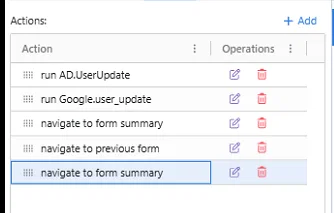
Workaround #2: Add 2 additional navigate to forms, first one will go to the form that displays the variable, next action should be navigate to previous, last action is navigate to the form again (example below)
CSV-SFTP - Reports of "No SFTP Connection Available"
Workaround: Enable "Do not reuse the SFTP Connection for multiple file read operations"
Sessions - If a browser is left open for more than 12 hours, it's possible that when presented with the login screen then login you will be logged out immediately.
Workaround: Hit refresh in the browser before logging in